Security and Privacy in the Internet of Things
Everyday
Li Kang Tan
Julia Odden
Conor Kotwasinski
Chloe Braswell
1 May 2024
15 min read
What is an Internet of Things (IoT) device?
An IOT device is a regular everyday object that has a computer embedded into it to make it "smart." For example:
Lightbulb
- Computer capabilities added: Wireless communication
- Resulting IoT device: Smart bulb controllable from your phone
Door Lock
- Computer capabilities added: Motion sensing + wireless communication
- Resulting IoT device: Smart home alarm system
Speaker
- Computer capabilities added: Voice recognition + wireless communication
- Resulting IoT device: Smart home assistant (e.g. Alexa, Google Home)
However, this ecosystem really should be called the "Internet of Insecure Things." There are many avenues to exploit IoT devices, and in this document, you will learn about some of them, as well as how to protect yourself.
Ensuring security: How to avoid being a hacker's target
In this section, we'll discuss strategies to minimize the risk of being hacked, or having someone take over your device illegally and with malicious intentions.
Whom does this apply to?
If you are able to control your home IoT devices (lights, microwaves, etc.) from outside your house, this section applies to you.
What is happening?
Just as burglars walk through neighborhoods to look for houses that look like they might be easy targets (doors left unlocked, windows left open, etc.), hackers also regularly scan the Internet for easy targets. If you can control your devices from outside your home, then attackers can also see your devices as they scan the Internet.
Why is this a problem?
When burglars see a house that is frequently left unlocked, they note down the address so that they can break into it at a later time. Similarly, once hackers see your devices on the Internet, they note it as a potential target. A good way to avoid being attacked by hackers is to not appear on their list at all.
How do I fix this?
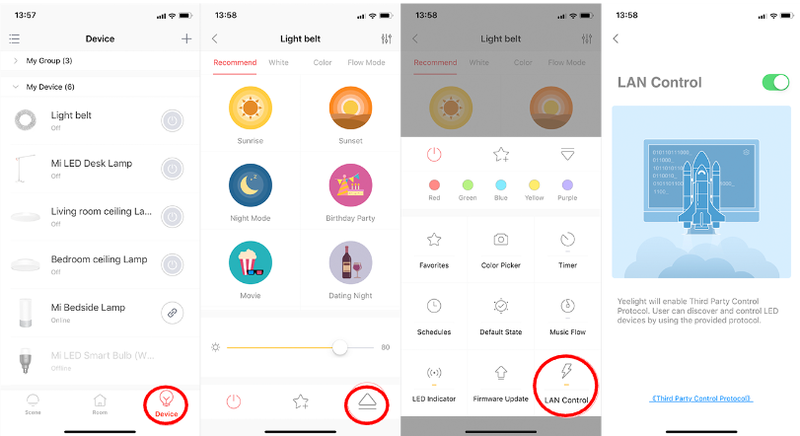
Set your IoT device to be only accessible when you're sharing its local network (i.e., when you're at home). We have an example below, and the exact steps will differ by device, but look for a setting that allows you to turn on local area network (LAN) control. Pictured below are ways to do this from various smart apps.
How to prevent default password attacks
Whom does this apply to?
If you are not 100% sure that you have changed the default passwords on your IoT devices or network router, this section applies to you.
What is happening?
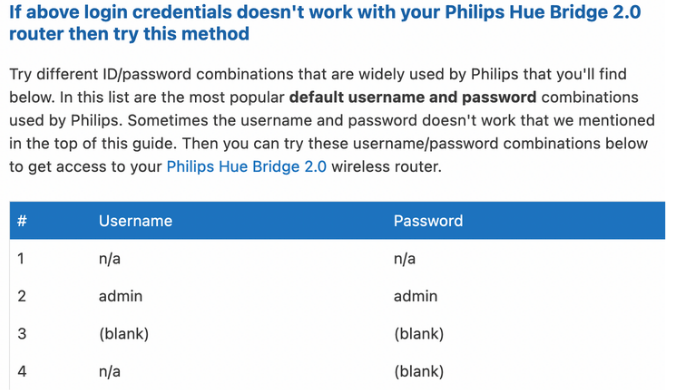
Most IoT devices and network routers have a set of default credentials that come with them so you can log into the device for the first time. Those credentials are often available on the Internet, either on manufacturer help pages or in owner's manuals. However, most IoT devices use very insecure default password combinations. Some example default usernames and passwords include: support/support, admin/admin, admin/0000, user/user, or root/12345.. If you do not change your default username and password, then the login information for your device is publicly accessible on the web for anyone to use. Pictured below are default usernames and passwords used by a Philips router.
Why is this a problem?
In 2016, a hacker organization created something called the Mirai Botnet–basically, a large collection of devices that they could control. First, they searched the Internet for accessible devices. Then, they gathered a list of the 62 most common default usernames and passwords and tried to access all the devices they found. By September 20, 2016, they had 150,000 devices under their control, using only those 62 sets of credentials. Think of default credentials as a master key to every house in a neighborhood. By leaving default credentials on the device, you're doing the computer-equivalent of not changing your locks. If the master key is floating around on the Internet, it's essentially the same as not having a lock on your door at all.
How do I fix this?
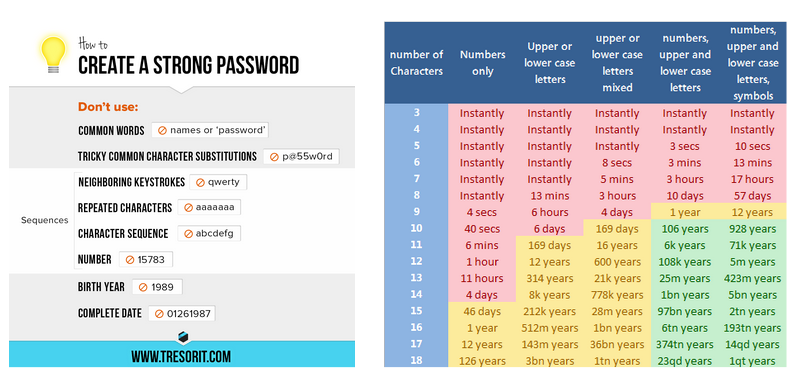
Make sure you change your default credentials. Most IoT devices have a "settings" menu on their mobile app, and within that "settings" menu should be a profile option or a security menu. You should be able to navigate from there to a page to change your password. When changing your password, remember to keep in mind good password design: avoid using any complete common words or phrases you share on social media; use a mix of capital letters, lowercase letters, numbers, and symbols; and make your passwords longer than 12 characters. All of these measures will dramatically increase the amount of time it takes a hacker to "crack" (or, guess) your password.
How to prevent hackers from infiltrating your IoT devices
Whom does this apply to?
If your IoT devices are running outdated firmware, or you are not sure when the last time you updated your IoT firmware is, this section applies to you.
What is happening?
You've changed your passwords, so the hackers can't just log in to your devices, which is great! Unfortunately, just as burglars don't need the key to break into your house, hackers are also able to hack your devices without knowing the password.
Bugs in the firmware of your devices can sometimes allow hackers to gain unauthorized access into the device.. When these bugs are found, companies usually release software updates to fix them. However, if you are running an old version with the bug, the hacker can use the bug to gain access to your device.
Why is this a problem?
Once a hacker is in your device, they can install malware, which lets them run code to do more harmful things (explained in sections below).
Here are some video examples of simple things that hackers can do after they have infiltrated your devices:
How do I fix this?
Always update the software and firmware on your devices when prompted, and check for updates periodically if you are not prompted.
How to avoid information theft
Whom does this apply to?
If you use the same login information on your IoT devices as you do on other accounts, or if your IoT devices collect any personal information about you (home information, car information, medical information, etc.), then this section applies to you.
What is happening?
98% of IoT network traffic is unencrypted. This means that anything your IoT device sends or receives (including any interaction between your phone and the device itself) is readable in plain English to anyone who might be watching (and it is free and easy to watch network traffic with basic tools like Wireshark. This traffic often includes login credentials, information about the device, and information gathered by the device.
Why is this a problem?
Any data that has been sent to or received from your IoT device can be easily acquired by hackers. For some concrete examples, hackers might be able to get an interior floor plan of your house from your Roomba, view the status of your smart alarm or door locks, see information gathered by medical IoT devices such as heart monitors, or even view information on your car from a smart car charger like one from Tesla. That information can be leveraged to compromise your personal security or sold to companies that gather personal data for marketing.
How do I fix this?
This isn't really one way to remove the risk entirely, but you can definitely take action to minimize harm. First, make sure you are not recycling your IoT passwords on any other accounts. If your Gmail has the same password as your smart lights, and an attacker sees your login credentials for your lights, they can now log into your Gmail. Also, avoid using any IoT devices that gather or require extremely personal data, except when required for medical reasons. Smart alarms and door locks are examples of devices that should be avoided. Similarly, be wary of any IoT devices that include location tracking.
How to prevent hackers from controlling your devices
Whom does this apply to?
If any of the previous sections have applied to you, this one does, too.
What is happening?
If attackers can access or infiltrate your device, then the chances are good that they can also remotely control your device by logging in remotely, exploiting software bugs, or other methods. First, an attacker will use an initial vulnerability to open a "backdoor" on your device, which is an easy way for them to connect to it. After opening that backdoor, they can send malicious code to your device to make it follow their commands instead of yours.
Why is this a problem?
If attackers can get a backdoor onto your device, they can make it do whatever they want. They can turn alarm systems on and off, turn on vacuums, raise your power bill, and probably commit several forms of property damage. A common target for this kind of attack are medical devices; up to 51% of threats against healthcare organizations involve compromised medical imaging devices.
How do I fix this?
If you think someone has gotten into your IoT device, you have several options. First, try to factory reset the device. This process looks different for every device, and you may need to consult the manufacturer's guide on how to do it for yours. This will simply reset the device to its original state; you'll have to reconfigure your username and password, and then you're good to go. You can also try resetting passwords and updating firmware and software. If all of this fails, you may need to replace your device.
How to prevent hackers from getting into your other devices (including laptops and phones)
Whom does this apply to?
If your IoT devices are running on the same WiFi network as the rest of your personal devices, such as laptops and phones, then this section applies to you.
What is happening?
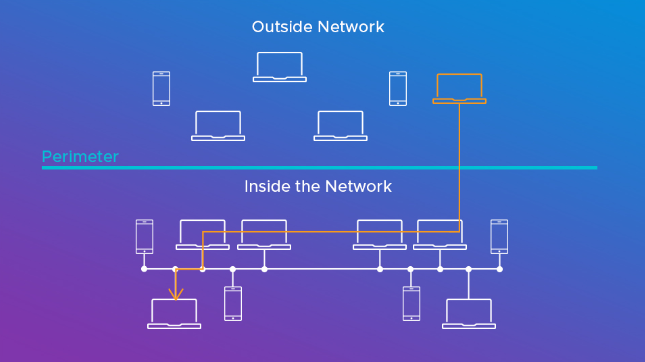
A hacker can go from controlling your IoT devices to controlling your phones/laptops/other devices.
We can think of devices that share the same WiFi network as being in the same "cyberspace." Just as it is pretty easy to move between two places in the same physical space (from your kitchen to your living room, for example), it is relatively easy for a hacker to move from your IoT device to your personal device if they are in the same "cyberspace.". This technique is known as lateral movement.
Why is this a problem?
A hacker who has access to your personal devices might gain access to even more sensitive information, such as your bank details (if you use internet banking), and can cause even more harm to you.
How do I fix this?
Isolate your IoT devices to their own WiFi network.
We have an example from the Xfinity WiFi controller app. You will want to look for a similar setting, and turn on the split bands settings.
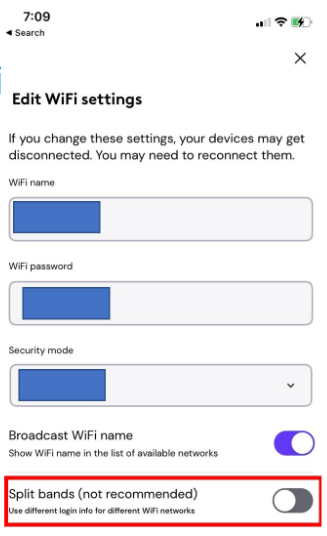
You will notice that this involves changing a setting which is marked as "not recommended". Indeed, this step requires a certain amount of technical expertise. If you are not comfortable with this step, we urge you to weigh the pros and cons, and consider if you really want to set up an IoT system.
How to avoid becoming a zombie
Whom does this apply to?
If the section on hackers controlling your devices applies to you, this one does, too.
What is happening?
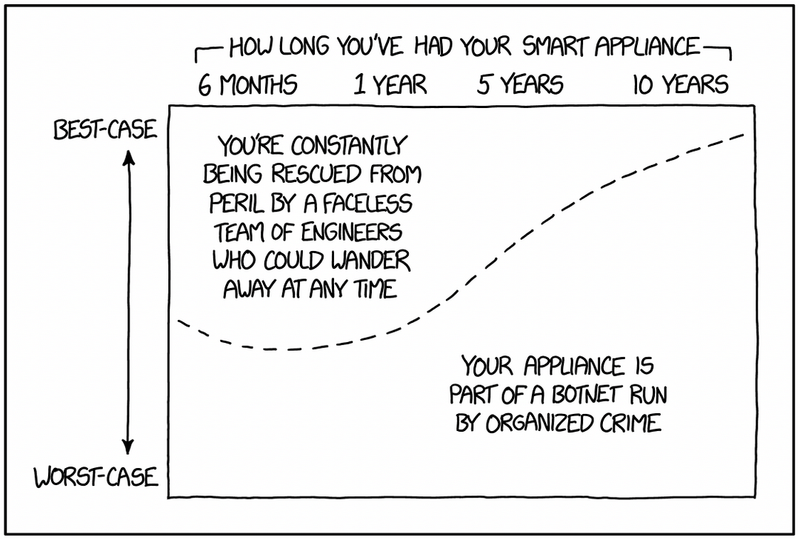
At this point, you need to stop thinking of your IoT device in terms of what it does and start thinking of it as a resource. An IoT device has computing power (by definition; see the introductory section above!), power, and network connectivity. Hackers can write code to control hundreds or thousands of IoT devices at once and use them as one giant computer, sort of like a hive mind. You specifically aren't a target in this kind of attack; your device's power and computing resources are being stolen to help a hacker achieve a bigger end goal.
Why is this a problem?
For you, this may look like your device being "bricked"; that is, your device can slow down or stop working, because all of its computing and power resources are being diverted to whatever a hacker wants. But what can a hacker do with all of these devices? A common application is mining cryptocurrency; with thousands of small devices, a hacker can create a pretty sizable mining operation equivalent to a few big computers. Hackers can also use IoT devices to execute distributed denial-of-service (DDoS) attacks, where thousands of devices flood a service like a website or application with traffic and cause it to shut down. Finally, hackers can also utilize the electrical power of your devices. Remember the year that Texas got snow and it overloaded the power grid? Imagine if a hacker had control of 500 Nest home systems in Dallas and decided to turn everyone's heat on to the max at once. That could cause a catastrophic power failure. This is called a MaDIoT (Manipulation of Demand via IoT) attack.
How do I fix this?
Since this is only a small extension on how an attacker can control your device, the strategies for fixing it are the same as in that section. Start with a factory reset, updating software, and changing passwords; and if necessary, seek professional help or replace the device.
Ensuring Privacy: Protecting your personal data in the Age of IoT
In the last section, we assumed the existence of some hacker acting illegally and with bad intentions. In this section, we'll discuss a different kind of compromise: how companies can use your data in completely legal ways that can still compromise your privacy.
Best Practices for Privacy
The Internet of Things (IoT) has revolutionized the way we interact with technology. From smart home devices to wearable fitness trackers, IoT devices have become ubiquitous in our daily lives. However, with this increased connectivity comes potential risks to personal data security and privacy. As more devices become connected to the Internet, they also become vulnerable to cyber attacks and data breaches. In recent years, there have been several high-profile incidents where IoT devices were hacked, leading to compromised personal information and even physical harm. As such, it is crucial for users to take steps to protect their personal data when using IoT devices. In this paper, we will explore several best practices for keeping our IoT devices and personal information safe. We will discuss the importance of end-to-end encryption and local data storage, using virtual private networks (VPNs) for remote access, reading privacy policies carefully before purchasing and using IoT devices, disabling unnecessary features on IoT devices, looking for IoT privacy policies that explain how collected data will be shared with third parties and what measures are in place to prevent data breaches, and purchasing privacy-focused IoT devices. By following these recommendations outlined in this paper, users can enjoy the benefits of IoT technology while maintaining their privacy and security.
Understanding the Risks and Vulnerabilities of IoT Devices
The first step in protecting your personal data when using IoT devices is to understand the potential risks and vulnerabilities. While these devices offer convenience and innovation, they also pose significant risks to personal data and privacy. One of the main concerns is the lack of security measures implemented by manufacturers, which can leave devices vulnerable to cyber attacks and data breaches. Additionally, many IoT devices collect sensitive personal data, such as location, biometric data, and behavioral patterns, without clear consent or disclosure. This can lead to the misuse or exploitation of personal information, as well as potential violations of privacy rights. It is important for individuals to research and carefully consider the privacy policies and security measures of IoT devices before purchasing them, and for companies to prioritize user privacy and security in their product design and development.
Choosing Privacy-Focused IoT Devices
One of the most important steps in protecting your personal data when using IoT devices is to choose devices that prioritize privacy and security. Look for devices that use end-to-end encryption, which ensures that data is encrypted at all stages of transmission and storage. Additionally, consider devices that store data locally rather than in the cloud, as this can reduce the risk of data breaches. When purchasing IoT devices, read the privacy policy carefully to understand how your data will be collected, used, and shared. Look for policies that are transparent about data collection and sharing practices, and avoid devices with vague or overly broad policies. Finally, consider purchasing privacy-focused IoT devices from companies that prioritize user privacy and security. By taking these steps, you can help to ensure that your personal data remains safe and secure when using IoT devices. Now that we've covered some important steps to take when choosing privacy-focused IoT devices, let's take a closer look at some specific devices that prioritize privacy and security. Here are a few examples of IoT devices that have been designed with privacy in mind:
Apple HomeKit
- Apple HomeKit is a smart home platform that emphasizes privacy and security. It uses end-to-end encryption to ensure that data remains secure and inaccessible to unauthorized third parties. Additionally, Apple HomeKit provides users with voice-controlled smart home devices through Siri, which limits the amount of data collected.
eufy Security Camera
- The eufy Security Camera is a home security camera that places a strong emphasis on privacy. Rather than using cloud storage, the camera utilizes local storage for video footage, which provides added security and data safety. The camera is also equipped with advanced encryption capabilities to protect the video stream from potential hackers.
Mycroft Mark II
- Mycroft Mark II is a privacy-focused smart speaker that prioritizes the protection of user data. The device runs on an open-source platform and is designed to be completely customizable. Mycroft Mark II also features a hardware kill switch that enables users to turn off the microphone and camera when not in use, ensuring complete privacy.
How IoT Devices Collect and Share Data for Revenue Generation and Analytics
IoT devices are capable of collecting various types of data through sensors and other sources. For example, temperature sensors can collect data on the surrounding temperature, while GPS sensors can collect location data. Cameras and microphones can also collect data, such as s, videos, and audio recordings. This data can be shared with third parties in a number of ways, including data sale, analytics, and targeted advertising. While some people may be concerned about the privacy implications of data sale, others see it as a potential source of revenue for companies. Data collected by IoT devices can also be used for analytics, allowing companies to track user behavior and identify patterns. This information can be used to improve products and services, as well as to identify new business opportunities. Additionally, data collected by IoT devices can be used for targeted advertising, providing companies with insights into user behavior, location, and preferences.
Best Practices for Protecting Your Personal Data When Using IoT Devices
To protect your personal data when using IoT devices, it's important to keep your devices up-to-date with the latest software and security patches. This can help prevent known vulnerabilities from being exploited by hackers. Additionally, use strong and unique passwords for each of your IoT devices, and consider using a password manager to keep track of them all. Finally, consider using a VPN when accessing your IoT devices remotely to provide an additional layer of encryption and security. By following these best practices, you can help maintain your privacy and protect your personal data when using IoT devices.
Protecting your Amazon Echo
In 2018, a report revealed that Amazon Echo was recording and storing conversations of users without their knowledge. Here are four steps to enable privacy settings on your Amazon Echo:
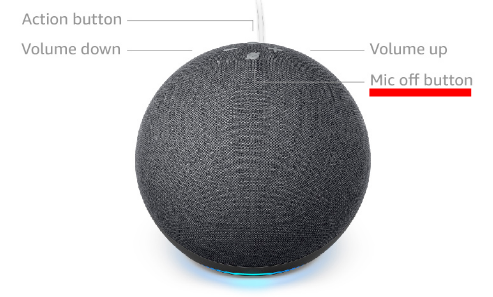
- Mute the Microphone: The Amazon Echo is designed to always listen for the wake word, such as "Alexa" or "Echo." However, you can mute the microphone on the device to prevent it from listening. To do this, simply press the microphone off button on the device.
- Review Voice History: Alexa stores recordings of your voice commands, which you can review and delete at any time. To do this, go to the "Settings" menu in the Alexa app, select "Alexa Privacy," and then select "Review Voice History."
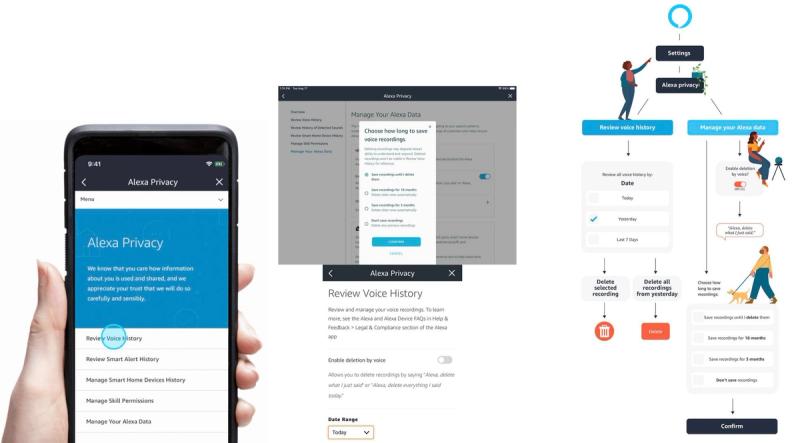
- Manage Skills: Alexa has "skills," which are like apps that you can add to the device. Some skills may request access to your personal information, so it's important to review the permissions that each skill requires before enabling it.
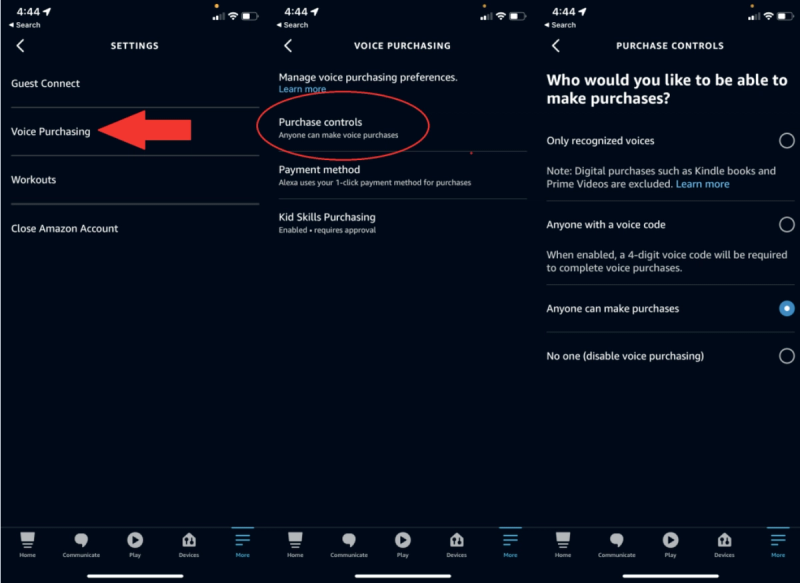
- Disable Purchase Voice Recognition: Alexa can be used to make purchases on Amazon, but this feature can be a privacy concern. To disable it, go to the "Settings" menu in the Alexa app, select "Alexa Account," and then select "Voice Purchasing."
Protecting your Google Home
In 2017, Google Home Mini was found recording and transmitting audio without permission due to a touch sensor defect. Google released a software update to fix the issue. In 2019, Google Home was reported to be recording audio of users without their command. Google attributed the issue to a device malfunction and committed to resolving it. Here are four steps to enable privacy settings on your Google Home:
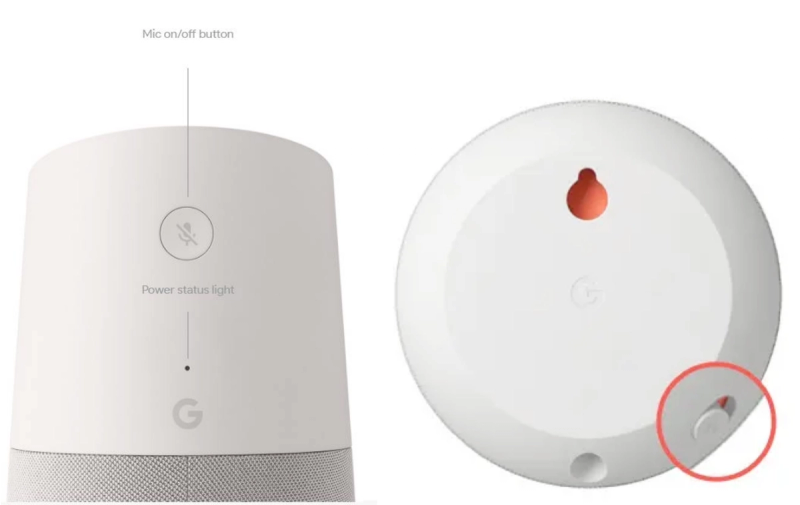
- Mute the Microphone: The Google Home is designed to always listen for the wake word, "OK Google." However, you can mute the microphone on the device to prevent it from listening. To do this, simply press the microphone off button on the device.
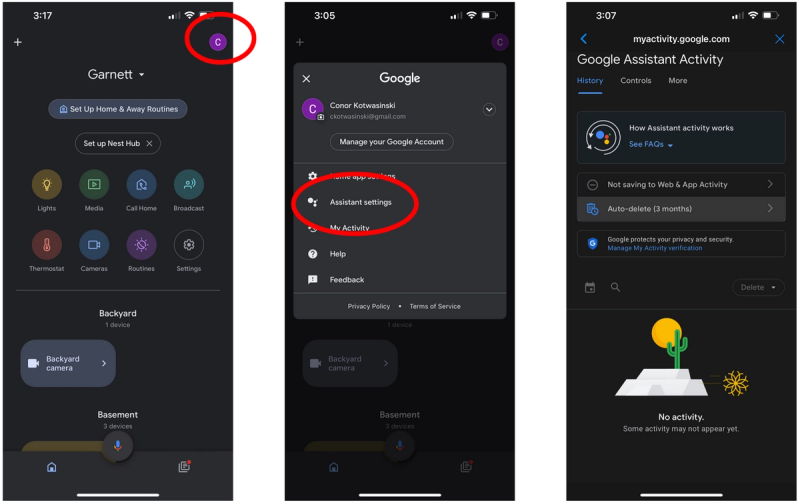
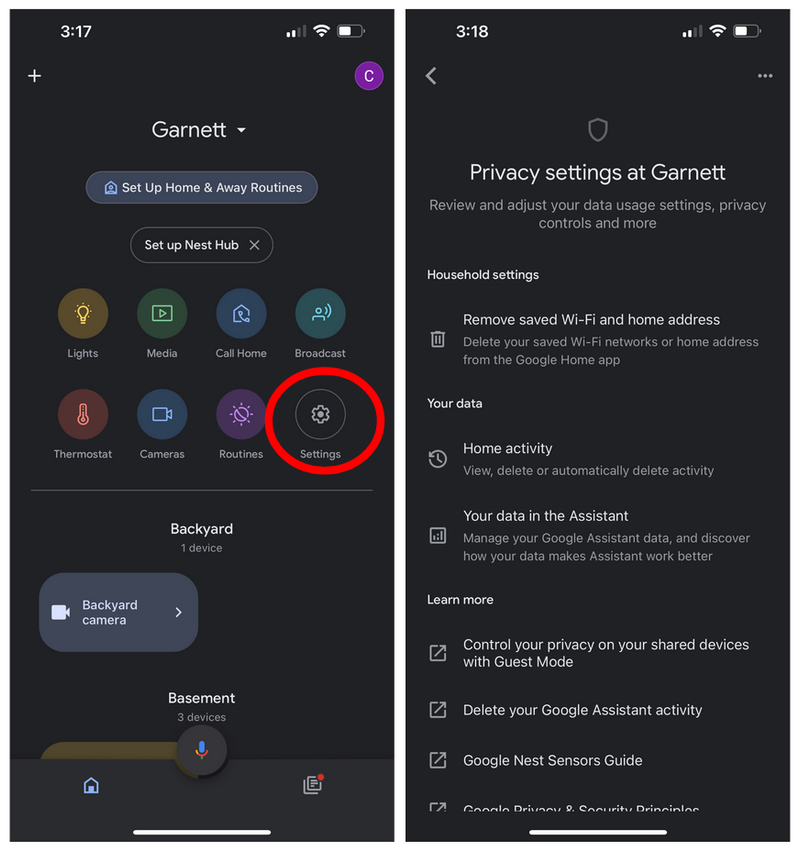
- Review and manage your Google Home activity: Google Home keeps a record of your voice commands and interactions with the device, which you can review and delete. To do this, go to the "My Activity" section in your Google account settings, select "Filter by product" and choose "Google Assistant". You can then view and delete individual voice commands or activity history.
- Turn off "Ok Google" voice recognition: If you don't want your Google Home device to listen for the "Ok Google" voice command, you can turn off the voice recognition feature. To do this, open the Google Home app on your phone, tap on your device, select "Settings", and then turn off the "Hey Google" or "Ok Google" wake word.
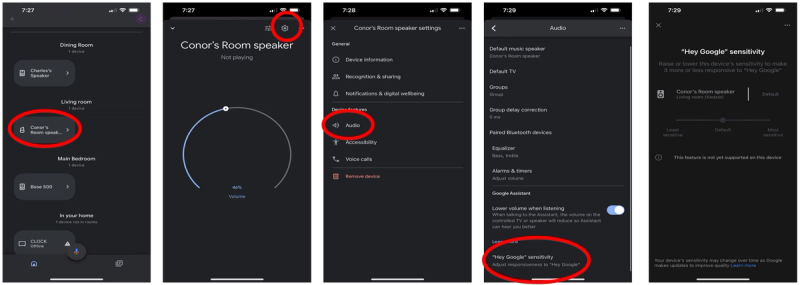
- Adjust privacy settings: Google Home allows you to adjust certain privacy settings, such as turning off personal results or changing the sensitivity of the device's microphone. To access these settings, go to the "Settings" section of your Google Home app and select "More settings," then choose "Privacy".
Protecting your Smart TV
In 2017, Vizio, a smart TV manufacturer, was fined $2.2 million for selling users' viewing data without their consent. If you own a smart TV or streaming device, it's essential to take steps to protect your privacy. Here are settings to disable on three most common smart TV and streaming device platforms:
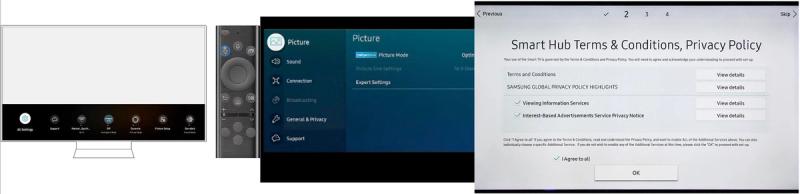
- Samsung: First, access the "Settings" option. Then, find and select the "Support" option. Once you are on the support page, scroll down until you see the "Terms and Policy" section and click on it. From there, look for the "Viewing Information Services" option and click on it. You will see an option to agree or disagree with the platform's monitoring of your viewing history. Uncheck the "I agree" option if you wish to prevent the platform from monitoring your viewing history. Next, navigate to the "Interest-Based Advertisements Service Privacy Notice" and turn it off. This will prevent targeted ads from appearing while you use the platform. By following these steps, you can customize your settings on this platform to control the monitoring of your viewing history and prevent targeted advertisements.
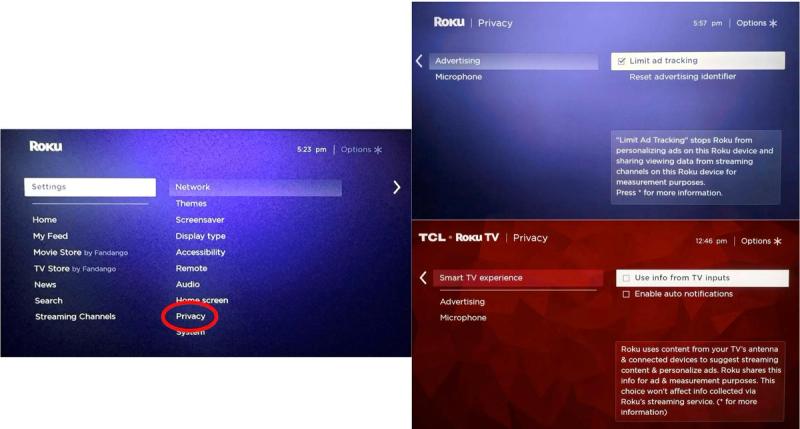
- Roku: To modify your Roku's privacy and advertising settings, start by accessing the "Settings" option from the home screen. From there, select "Privacy" to access the privacy settings. Once you are on the privacy page, find and click on "Advertising." This will bring up an option to "Limit Ad-Tracking," which you should check if you wish to restrict the use of your data for targeted ads. After checking this option, return to the previous screen and select "Smart TV Experience." You will see an option to "Use Information for TV Inputs," which is a feature that enables the smart TV's ACR technology. To disable this feature, uncheck the box next to "Use Information for TV Inputs." By following these steps, you can customize your smart TV's privacy and advertising settings, giving you more control over how your data is used by the device.
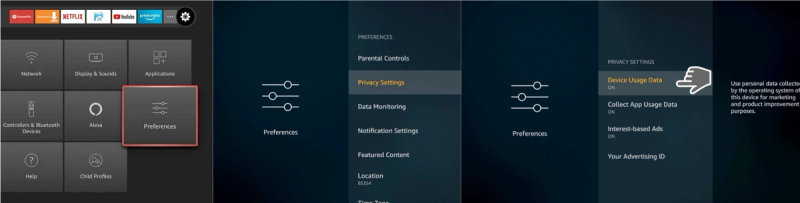
- Fire TV: To modify your device's privacy settings, access the "Settings" option, and then select "Preferences." From there, find and click on "Privacy Settings." Once you are on the privacy settings page, look for an option that says "Device Usage Data" and turn it off. This will prevent your data from being used for personal marketing purposes. Additionally, look for options to "Collect App and Over the Air Usage" and "Interest-Based Ads" and disable them as well. By disabling these options, you can prevent your data from being collected and used for targeted advertising. Following these steps will allow you to customize your device's privacy settings and control how your data is being used by the device.
Google's Acquisition of Fitbit
In 2019, Google announced its intention to acquire Fitbit, a fitness tracking company. The acquisition faced scrutiny from privacy advocates concerned about Google's access to users' sensitive health data. In December 2020, the European Union launched an antitrust investigation into the acquisition due to data privacy concerns.
Ring's Partnerships with Police Departments
Ring, a smart doorbell company, has faced criticism for its partnerships with police departments. These partnerships allow police to request access to footage from users’ doorbell cameras, raising concerns about surveillance and privacy.
Strava's Heat Map
In 2018, the fitness tracking app Strava released a heat map of user activity. The map inadvertently revealed the locations of secret military bases and other sensitive locations, causing a backlash against the company for its lack of data privacy measures.
Understanding Your Devices' Data Collection Practices
It's also important to be aware of the data that your IoT devices are collecting and sharing. Review the privacy policy for each device to understand what data is being collected, how it's being used, and who it's being shared with. If you're uncomfortable with the data collection practices of a particular device, consider using an alternative or disabling certain features. Additionally, regularly review the settings and permissions for each of your IoT devices to ensure that they're only collecting and sharing the data that you're comfortable with. By staying informed about your devices' data collection practices and taking control of your settings, you can help protect your personal data when using IoT devices.
Understanding IoT Privacy Policies
Before delving into the details of an IoT privacy policy, it is important to first understand why reading it is crucial. A privacy policy is a legal document that outlines a company's data collection and usage practices, and understanding its purpose will help focus on the most important sections.
Scope of the Policy
The scope of the policy will explain the types of data collected, how it is collected, and the purpose for which it will be used. It is important to check this section to ensure that the device only collects necessary data and not any unnecessary personal information.
Data Sharing
One of the most crucial aspects to look for in an IoT privacy policy is how the collected data will be shared with third parties. The policy should explain why data is being shared and what third-party companies will do with it.
Data Security
IoT devices are vulnerable to data breaches, which can lead to data theft or even hacking of the device. It is essential to ensure that the policy outlines how data is secured and what measures are in place to prevent data breaches.
Opt-Out Options
Many IoT devices collect data automatically, and there may not be an obvious way to opt out of this. Ensure that the privacy policy explains how to opt out of data collection or sharing, if possible.
Policy Updates
Privacy policies can change over time, so it is important to check whether the policy includes information about how and when it will be updated. This is especially important for IoT devices with a long lifespan.
Seek Help If Needed
If any part of the privacy policy is confusing, you can reach out to the manufacturer for clarification. Alternatively, seek the help of a privacy professional to understand any complex language used in the policy. By following these guidelines, you can make informed decisions about the use of your personal data by IoT devices.
Conclusion: Protecting Your Privacy and Security When Using IoT Devices
In conclusion, while IoT devices offer many benefits and conveniences, they also come with significant privacy and security risks. By following the best practices outlined in this article, you can help protect your personal data and maintain your privacy when using IoT devices. Remember to choose privacy-focused devices, review privacy policies, keep your devices up-to-date and secure, monitor for suspicious activity, and stay informed about your devices' data collection practices. By taking these steps, you can enjoy the benefits of IoT technology while minimizing the risks to your personal data and privacy.